


Tracking staff hours at a tuition centre sounds simple until you try to do it well. Paper sign-in sheets get forgotten or backfilled. Physical time clocks cost money, sit at one door, and only work for the branch they're installed in. And the biggest gap of all: the manager is often not at the centre when staff arrive and leave, so attendance performance goes unverified — which matters when part-time tutors are paid by the hour.
The practical answer is to move time tracking onto the device every staff member already carries. Here is how mobile clock-in works in SchoolTracs and how it fits into the rest of your staff management.
Why do traditional time clocks fall short for tuition centres?
Some education centres use dedicated time clocks to record staff attendance. That works, but it comes with recurring friction:
- You have to buy and maintain additional hardware for every location.
- Records live in the machine, so reviewing them means being on-site or exporting data manually.
- The manager can't monitor staff attendance performance without physically being at the centre.
Using SchoolTracs, no additional hardware is needed at all — the time clock is replaced by the system your centre already runs on.
How does mobile clock-in and clock-out work?
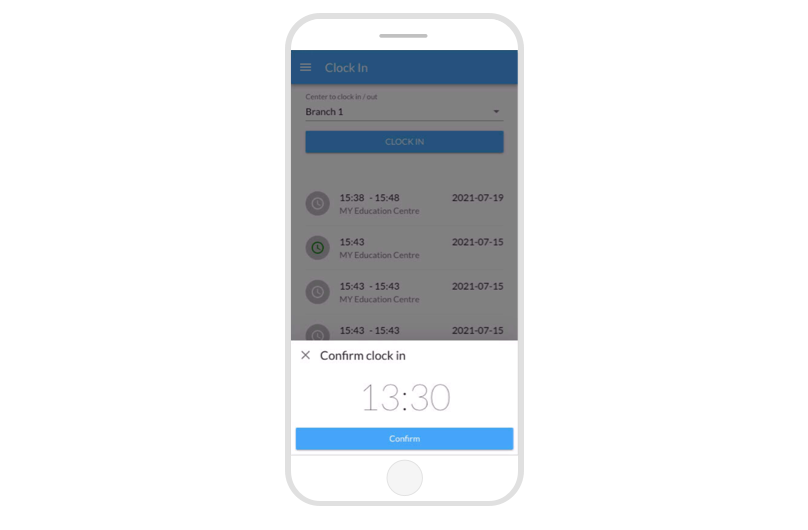
Staff use a mobile browser to log in to the system and clock in and out — there's nothing to install and no kiosk to queue at. Their clock-in and clock-out times are recorded in the report automatically, so you can keep track of staff attendance anytime. Staff who prefer a scan-based routine can clock in and out by QR code instead of tapping through the menu — a separate feature from student attendance QR, purely for staff time tracking, and one real teams use daily.
Because the records live in the system rather than in a device at the front door, managers can log in to check anytime and anywhere. Owners who split their week across branches, or who work off-site, still see exactly when each staff member started and finished — the same up-to-date report from any branch, home, or a phone between meetings.
What else can staff do from the same mobile access?
Clocking in is only one part of a teacher's day. From the same mobile login, teaching staff can also:
- Check their teaching schedules for the day or week.
- Take student attendance during lessons.
- Search students' contact details when they need to reach a family.
Read more about marking student attendance on mobile. Putting these tasks in one place means staff hours, lesson delivery and student attendance are all captured in the same system as they happen.
How do tracked hours feed into payroll?
Accurate hours are most valuable at the end of the month. Because clock-in and clock-out times are logged in reports, you have verified working hours to base hourly pay on — instead of self-reported timesheets that need chasing and checking. If a tutor's recorded hours don't match the schedule, you can see it in the report and resolve it before payday rather than after.
The same report answers the questions owners actually ask: which tutors consistently arrive early, whose hours are creeping past what was rostered, and whether staffing at each branch matches the lesson load. Because the data accumulates automatically, those answers are a login away instead of a month-end reconstruction exercise.
From there, the natural next step is automating the calculation itself — a dedicated Time Clock Detail report pairs directly with this workflow, giving you the same clocked hours in the format payroll needs. See our guide on how to calculate tutor payroll for turning tracked hours, lesson rates and commissions into accurate pay runs.
How do I roll out mobile clock-in without pushback?
Time tracking succeeds or fails on staff buy-in, so introduce it as a convenience rather than surveillance. A rollout that works in practice:
- Explain the payoff for staff: hourly tutors get paid on verified hours with no timesheet to fill in and no disputes at month-end.
- Set a clear routine: clock in on arrival before the first lesson, clock out after the last — the same expectation for everyone, including managers.
- Review reports weekly at first: catch missed clock-ins early while the habit forms, rather than reconstructing a whole month later.
- Agree a correction process: decide up front how a forgotten clock-out is handled, so the record stays trustworthy.
Within a couple of weeks the routine is invisible — staff tap their phone on the way in, and the attendance report simply fills itself.
Tracking staff hours doesn't require hardware, paper, or a manager standing by the door. With mobile clock-in, times are recorded the moment staff arrive, reports are available from anywhere, and payroll starts from numbers everyone can trust. Apply for a free trial of SchoolTracs to set up mobile clock-in for your team.
Frequently asked questions
Do I need a physical time clock to track staff hours?
No. With SchoolTracs, staff clock in and out from a mobile browser, so no additional hardware is needed. Their clock-in and clock-out times are recorded automatically in reports.
Can I check staff attendance if I'm not at the centre?
Yes. Managers can log in to the system to check staff attendance records anytime and anywhere, which is especially useful for owners who split time across branches or work off-site.
What else can teaching staff do from their mobile?
Beyond clocking in and out, staff can check their schedules, take student attendance and search students' contact details from the same mobile access.
How do tracked hours connect to payroll?
Recorded clock-in and clock-out times feed the attendance report, which gives you verified hours to base hourly pay on instead of self-reported timesheets, and pairs naturally with a payroll workflow for tutors.