



For many tuition centres, every booking still runs through the front desk. Parents call to ask which time slots are free, message to take leave, and wait for staff to rearrange make-up lessons, and none of it can happen outside office hours. Meanwhile, prospects who see your courses promoted online have nowhere to actually buy: the ad works, but the sale still depends on a phone call the next morning.
An online booking store lets parents enrol outside office hours and handles routine booking without a front-desk conversation. This guide explains how to set up the SchoolTracs Online Store: what to sell, how to publish availability, how to brand it and how self-service rescheduling works.
The current V3 store has a revised checkout and enrolment-confirmation flow. If you evaluated an earlier version, test the current workflow rather than relying on the older interface.
What should my centre sell online?
Start by publishing transparent course information and bookable time slots so customers can browse anytime. The store supports the selling formats education centres actually use:
- Class packages: playgroups, yoga, and dance courses typically let customers buy a package first and book lessons later within a valid period. This motivates purchase without commitment anxiety, and makes changeable student schedules easier to manage.
- One-off sessions: workshops and activities promoted through online channels can send new customers straight to checkout, raising conversion instead of ending at an enquiry.
- Trial classes: offer a free or paid trial before enrolment. Showcasing trial booking dates online is far more convenient for parents than negotiating slots by call or message.
- Products: sell textbooks and other items alongside courses in one complete catalog, then mark purchased products as "Fulfilled" upon pickup to simplify inventory management.
How do I publish bookable time slots?
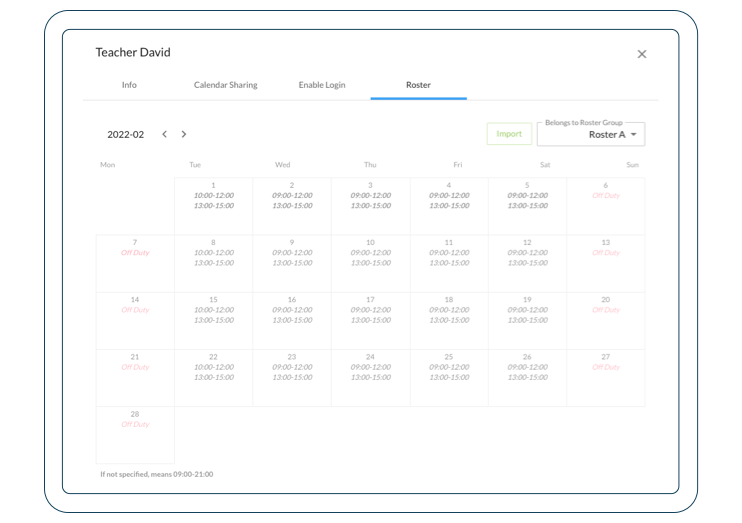
Availability is generated from data you already maintain. Set up each teacher's roster, on-duty hours, lunch hours, and days off, and the store generates available time slots from the roster and course capacity. You can present availability the way your clients prefer to browse, by class or by teacher.
The store then keeps itself accurate: any roster revision syncs to every teacher's availability, a full course displays as fully booked, and once a time slot is full the store closes new enrolment. When a customer reschedules, the freed capacity is updated for other customers. Every successful booking triggers a custom email notification to the client.
How do I make the store look like my brand?
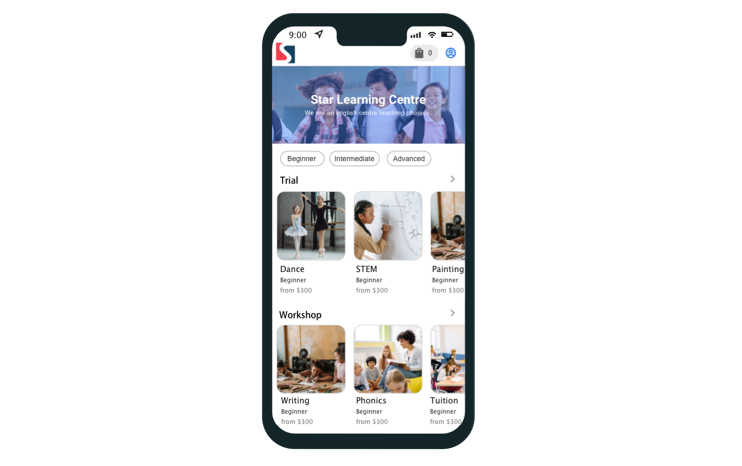
A professional storefront appeals to potential customers, and it should look like yours, not like generic software. You can tailor the theme to your brand identity: insert your logo, upload custom banners, and change the colour tone of the store. Setup is fast, so you can publish and start selling without a web development project.
The catalog itself displays an organised course selection that customers can search easily, and the store works on any device, laptops, tablets, and smartphones.
How do I collect the right information and payment at checkout?
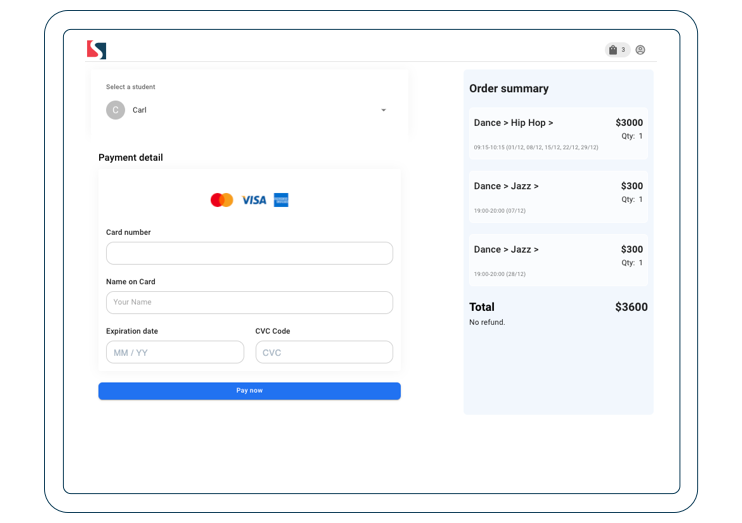
Before enrolling, clients complete an information form you control. Adjust it to gather exactly what you need, such as the parent's contacts, the student's birthday, school, level, or address, so every online enrolment arrives as a complete record rather than a follow-up task.
After booking, customers pay online immediately by Visa or MasterCard to reserve the seat. Payment at the moment of intent shortens the sales cycle: no invoice to chase, no seat held for someone who never shows. If you run promotions, discount codes and automated discount rules give hesitant parents a reason to complete checkout on the spot.

How do parents reschedule lessons themselves?
Today, a student who needs leave calls or messages you, and your staff spend time rearranging the lesson. In the online store, package customers handle it themselves in three steps:
- Step 1: sign in to your online store with a mobile phone number or email, and click "My Orders" to view outstanding courses.
- Step 2: if they cannot attend a class, click "Cancel" to cancel the original schedule.
- Step 3: click "Add new lesson" and select a new date to enrol. Once confirmed, a confirmation email is sent automatically.
Because packages let customers buy first and schedule lesson by lesson until the package is used up, this self-service loop covers the entire lifetime of the purchase, not just the first booking.
A launch checklist for your first week
Most centres can go from zero to a live store in days rather than weeks. A practical order of work:
- Day 1: pick your first products. Start with one or two course packages and a trial class, the formats with the clearest demand, rather than migrating your whole catalogue at once.
- Day 2: enter rosters and capacity. Availability is only as accurate as the rosters behind it, so confirm each teacher's on-duty hours, lunch breaks, and days off before publishing.
- Day 3: brand the storefront. Add your logo, banner, and colour tone, and check the store on a phone, since that is where most parents will see it.
- Day 4: set up the enrolment form and payment. Ask only for the fields you genuinely use; every extra field costs completions.
- Day 5: soft launch. Share the link with a handful of existing parents, watch a few real bookings and one real self-reschedule come through, then put the link in your ads, bio links, and email signatures.
What does this change for the business?
The immediate win is that sales no longer stop at closing time: even in non-office hours, customers can purchase courses easily, and promoted workshops convert directly instead of generating call-backs. The quieter win is admin time. Availability questions, booking confirmations, and rescheduling all move out of the phone queue, while enrolment and online payment are streamlined into one flow that improves operational efficiency.
The store also feeds your admissions funnel. New visitors who are not ready to buy become enquiries you can nurture, and if you track those leads properly, see our guide on turning enquiries into enrolments, the online store becomes the conversion point at the end of that pipeline.
SchoolTracs states that it has 450 subscribers across centre types including tutoring centres, preschools, music schools and dance academies. Launch your own branded booking store with a free trial at www.schooltracs.com.
Frequently Asked Questions
What can a tuition centre sell through an online booking store?
Class packages that parents buy first and book lesson by lesson, one-off sessions and workshops, free or paid trial classes, and physical products such as textbooks, all in one catalog with online Visa/MasterCard payment.
How do customers see which time slots are available?
The store generates bookable time slots from teachers' rosters and course capacity, displayed by class or by teacher. When a slot is full it shows as fully booked and closes new enrolment, and any roster change syncs to the store automatically.
Can parents reschedule lessons themselves online?
Yes. They sign in with mobile phone or email, open My Orders to view outstanding lessons, cancel the original schedule, then add a new lesson on an available date. A confirmation email is sent automatically.
Can I match the online store to my centre's branding?
Yes. You can insert your logo, upload custom banners, and change the store's colour tone to fit your brand identity, and the store works on laptops, tablets, and smartphones.
How do I collect the enrolment information I need at checkout?
Adjust the enrolment form to ask for exactly what you need before booking, such as the parent's contacts, the student's birthday, school, level, or address.