



Most tuition centre owners know their business is doing "okay", but few can say precisely which branch is underperforming, which course sells best, how much of the money in the bank is actually earned revenue, or whether yesterday's cash drawer really balanced. The data exists — it is just scattered across receipts, spreadsheets and staff memory. Consolidating it manually eats hours every month and still leaves blind spots.
This guide walks through the five reports every tuition centre owner should check monthly (and one of them daily), how to read each one, and how SchoolTracs generates them automatically from your existing enrollment and payment records. These five are the ones to build a routine around — SchoolTracs actually ships over 20 named reports in total, grouped into financial, enrollment, staff and executive categories, and the rest of this guide points to where the others fit in.
Five management reports at a glance
| Report | Question answered | Frequency |
|---|---|---|
| Daily closing | Do recorded payments match what was collected? | Daily |
| Sales by course | Which courses generate revenue? | Monthly |
| Branch comparison | How do locations compare? | Monthly |
| Enrollment | Who joined, left or changed activity? | Weekly or monthly |
| Deferred revenue | What prepaid teaching remains undelivered? | Month-end or year-end |
1. How do I verify daily income with a daily closing report?
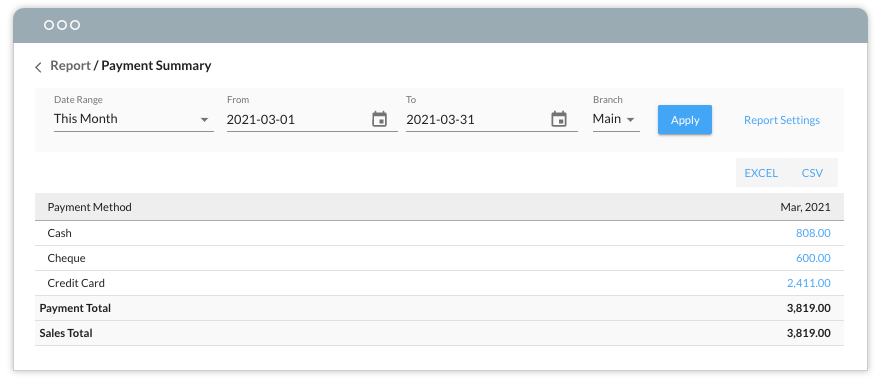
Balancing your cash drawer is an essential part of your learning centre's daily routine, and it is the foundation every monthly report is built on. The daily payment report breaks down the day's total income by payment method — cash, cheque, credit card, online payment and more — so closing the register becomes a simple matching exercise.
- At the end of day, run the payment report and view the total collected, grouped by payment method.
- Count the cash and total up cheques and card slips collected within the day.
- Match your physical totals against the report before closing the register.
- Owners can then reconcile the transactions with the bank account easily, so each branch's financial performance is tracked down to a day-to-day basis.
If the totals do not match, dig into the payment details report to eliminate the discrepancy. For example, if cash collected does not match the cash total, check whether a receipt was voided or refunded. The details report keeps your cash book as accurate as possible and makes discrepancies easy to trace. If you also sell products at the counter, product and course sales flow into the same daily figures — see our POS and inventory guide for how checkout records feed this report.
2. Which courses actually make money? Check the sales-by-course report
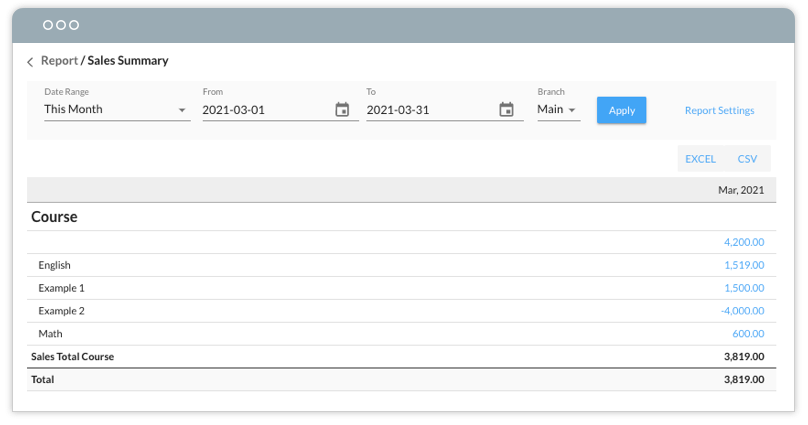
Knowing total income is not enough — you need to know where it comes from. Instead of sorting through a pile of receipts, the sales report shows the number of students enrolled in each course over a custom date range, so you can see at a glance which course sells best and compare income across your programme.
- Set a date range — a month, a term, or a promotion period.
- Compare income and enrolment counts by course.
- Use the ranking to decide which courses deserve more time slots or promotion budget, and which need a redesign.
3. How do I compare performance across branches?
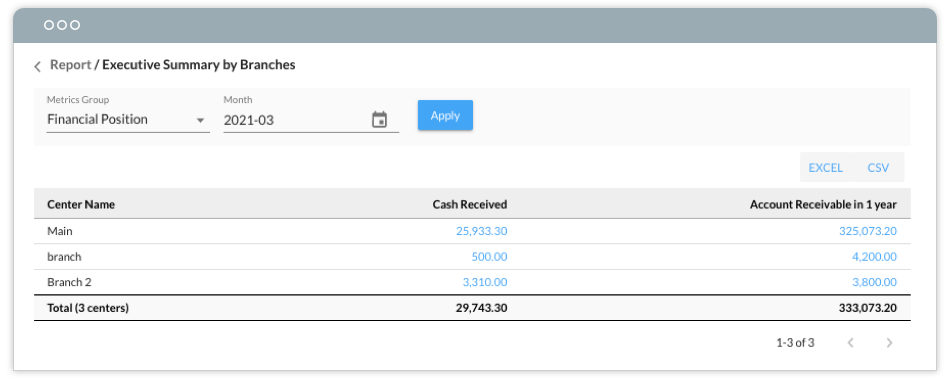
Monitoring the performance of multiple branches usually means hours of consolidating reports. SchoolTracs fetches data from your different branch system accounts and builds executive reports automatically, so you get a quick, reliable view of every location.
The report by branches shows cash received and outstanding payments from every branch side by side. You can immediately spot which branches are performing best and worst, investigate the reasons behind weak numbers, take prompt action to support struggling locations — or decide to put more resources behind the branches that are growing.
The same data viewed by period reveals your seasonal trend. As you analyse it, consider the big picture of what was happening at the time: did a new course offering drive the increase? Did a special offer lift sales enough to be worth continuing? You can also see how the business weathered disruptions such as the pandemic and how it is recovering, and identify peak and slack seasons so you can plan course offerings, promotions and other activities ahead of time.
4. What do enrollment reports tell me about students and teachers?
Enrollment data guides your sales strategy, course design and even human resource management — if you can read it without consolidating huge amounts of raw data. SchoolTracs enrollment reports are designed to be read in minutes, and three views matter most:
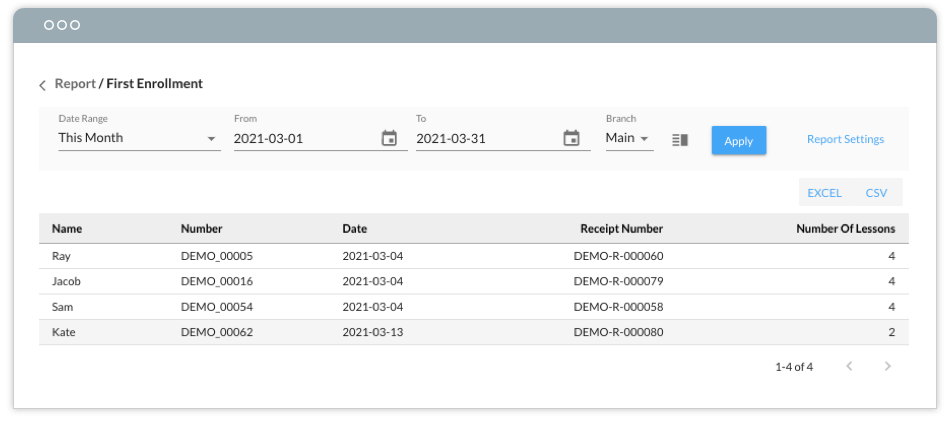
- First enrollment report — lists students who first enrolled in courses or only took free trial lessons in a specific period. Follow up with trial students to get feedback, understand their learning needs, and motivate them to enrol in regular courses.
- Last enrollment report — lists students who last enrolled or quit and have not paid for courses afterwards in a specific period. Use it as a call list to follow up on the reasons why students do not enrol in future courses.
- Enrollment metrics report — totals the number and hours of lessons taken by each class. For classes with many students, increase the time slots or spend more promotion budget; for classes with fewer students, modify the course design to meet students' needs.
The same metrics report also measures teacher performance by totalling the lessons and hours taught by each teacher. Centres can calculate bonuses for the teachers with the most teaching hours or students according to this report, motivating teachers to pursue better performance.
5. How much of my income is actually earned? The deferred revenue report
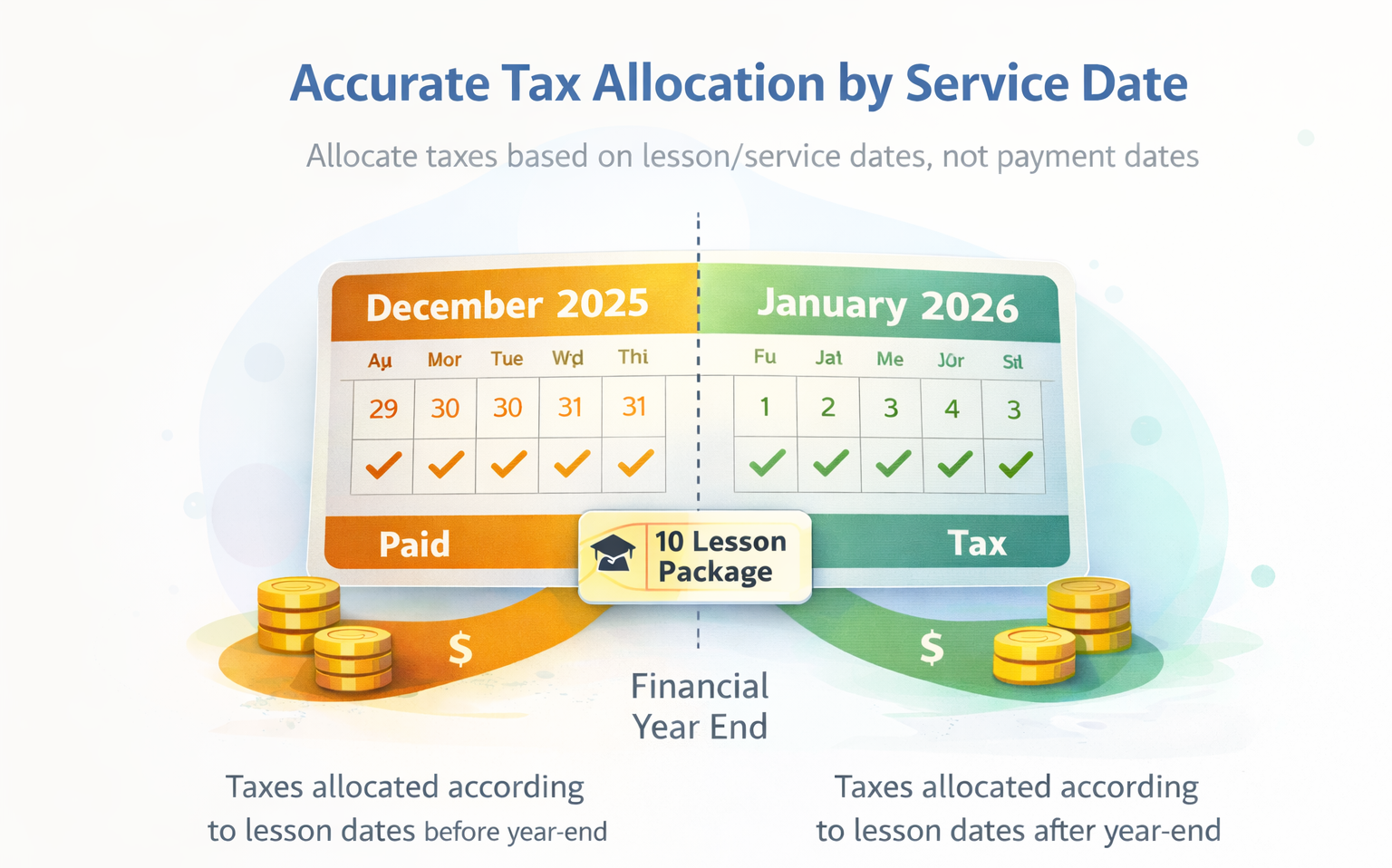
Education centres often collect fees before classes take place. A deferred revenue report (by class package) calculates the value attached to delivered and undelivered lessons as of a selected date. That gives your accountant a useful reconciliation, but it does not decide the accounting treatment: revenue-recognition timing depends on the applicable framework, contract terms and how the promised services are delivered.
- View all class packages at a glance.
- Calculate the value of undelivered classes as of a specified date.
- Use the report as a reference for accounting and tax filing across fiscal years.
Example: if a student buys a 10-class package before year-end and some lessons remain undelivered, the report calculates their value for review. Your accountant can then determine the appropriate revenue and tax treatment; the software report is supporting evidence, not a compliance conclusion.
How should a centre govern management reports?
Treat report handling as a management process. Document who needs each report, the decision it supports, how exported copies may be shared and when those copies should be removed. Review the process regularly as responsibilities change, and include report handling in your wider data-protection procedures.
What other reports are available?
Beyond the five above, SchoolTracs' full report library covers every category an owner ends up needing sooner or later:
- Financial: Payment Summary and Detail, Sales Summary and Detail, Earned Revenue Summary and Detail (the accrual-vs-cash view behind the deferred revenue report above), Discount Summary and Detail for auditing which promotions are actually costing you margin.
- Enrollment: First and Last Enrollment, Enrollment Detail and Metrics, and Package Usage for tracking how many lessons in a prepaid package remain unused.
- Staff: Salary Summary and Lesson Detail by Staff, alongside the Time Clock Detail report if you track clock-in hours — see our guide on tracking staff hours.
- Sales & leads: Product Summary and Detail for front-desk retail, and a Lead Conversion report that tracks your enquiry pipeline period over period — see turning enquiries into enrolments.
Most owners do not need to open all twenty-plus reports at once. Start with the five in this guide, and reach for the rest when a specific question comes up — a discount campaign you want to audit, or a lead source you want to prove out. Payment Detail and Enrollment Detail are useful starting points because they answer two frequent management questions: what was paid, and what changed in enrolment.
A simple monthly reporting routine
- Daily: close the register against the daily payment report; investigate any mismatch in the payment details report the same day.
- Weekly: scan the first and last enrollment reports and follow up with trial and departing students while they are still reachable.
- Monthly: review sales by course, the branch comparison, and enrollment metrics for classes and teachers; adjust time slots, promotion and staffing accordingly.
- Quarterly / year-end: run the deferred revenue report before closing the books and share it with your accountant.
All five reports are generated automatically from the enrollment and payment records you are already keeping. Try SchoolTracs free and see your centre's numbers without building a single spreadsheet.
Frequently Asked Questions
How do I balance the cash drawer at my tuition centre every day?
Run a daily payment report that breaks the day's income down by payment method — cash, cheque, credit card and online payment. Count the cash and total the cheques collected that day, then match the totals against the report before closing the register.
What should I do if the cash counted does not match the daily report?
Dig into the payment details report to trace individual transactions. Common causes are voided or refunded receipts. The details report shows exactly which transactions were changed, so you can resolve the discrepancy quickly and keep your cash book accurate.
How do I compare the performance of different branches?
A branch comparison report pulls cash received and outstanding payments from each branch's account into one executive view, so you can spot the best and worst performing locations without manually consolidating spreadsheets.
What is a deferred revenue report and why does a tuition centre need one?
Centres often collect fees before classes take place. A deferred revenue report calculates the value of undelivered classes as of a chosen date and gives your accountant a useful reconciliation. The correct timing of revenue recognition depends on the applicable accounting framework, contract terms and how performance obligations are satisfied; the report does not by itself determine accounting or tax treatment.
How should a centre govern management reports?
Document who needs each report, why they need it, how it may be shared and when exported copies should be removed. Review the process regularly as responsibilities change.