



If you run an education centre, you probably know the pattern: one WhatsApp group per class, a few more for parents who prefer email, staff replying from personal phone numbers, and no record of who was actually told about last Tuesday's cancelled lesson. Keeping parents informed is vital, but doing it through personal messengers means missed messages, no accountability, and constant "did anyone reply to that parent?" moments at the front desk.
This guide walks through how SchoolTracs replaces that scattered workflow with one system: targeted notifications, a built-in class messenger, signed notices, automatic lesson reminders, check-in alerts, and a parent app that answers the routine questions before parents even call. Every message is logged, so your team always knows what was sent, to whom, and when.
How Do I Send a Notification to Exactly the Right Parents?
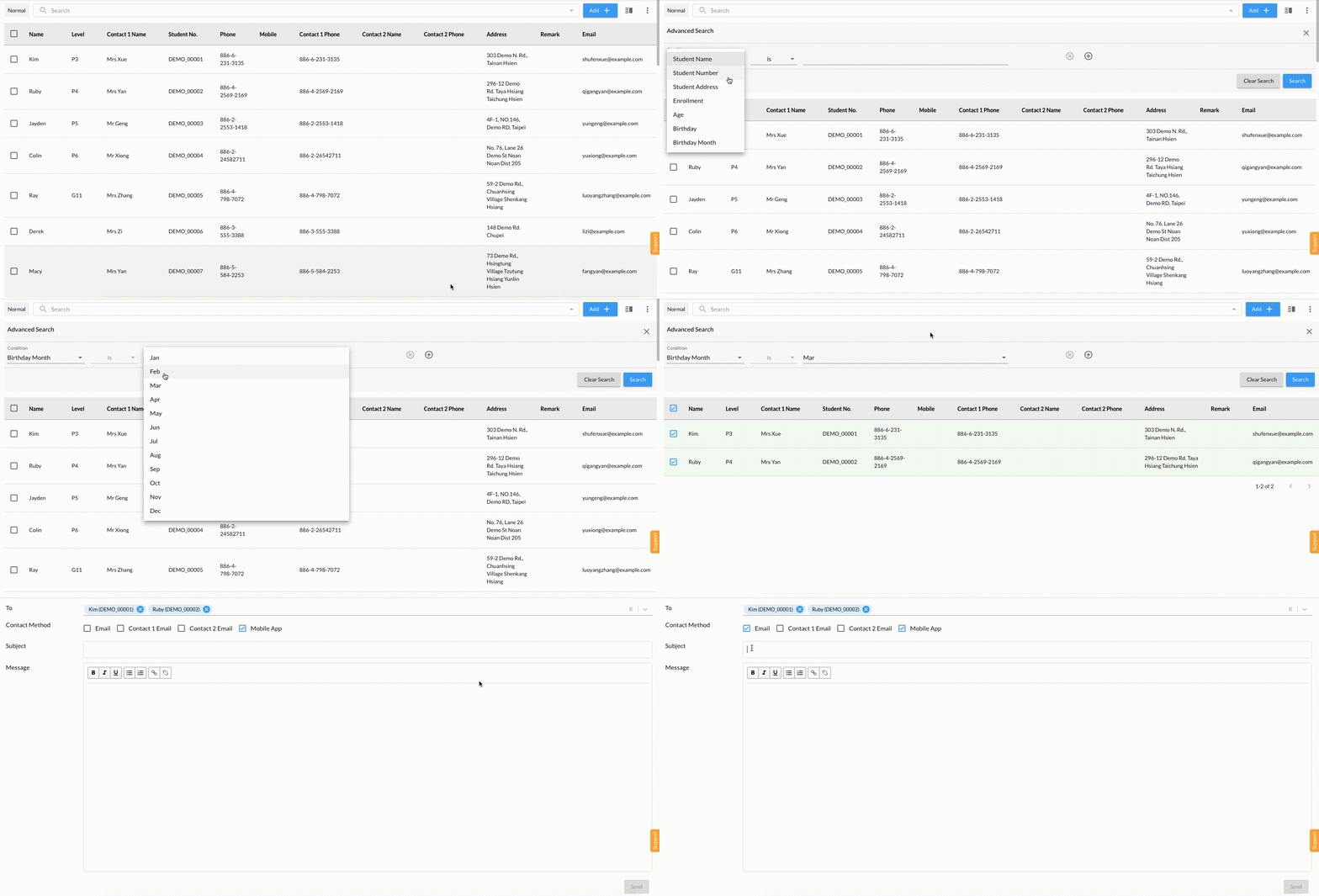
Most updates only concern some families: a promotion for a new course, or a lesson change for one class. SchoolTracs stores students' phone numbers and email addresses, and its advanced search finds the correct contacts in seconds. Administrators can search by student name, student number, address, enrollment date, age or birthday, then send the message by email or directly through the SchoolTracs App.
- Filter students by course, enrollment date or other conditions to build a target group.
- Send to the whole group at once by email or in-app notification.
- For time-sensitive updates such as lesson cancellations, in-app messaging is the fastest way to reach the right parents.
How Do I Replace WhatsApp Groups with Something Safer?
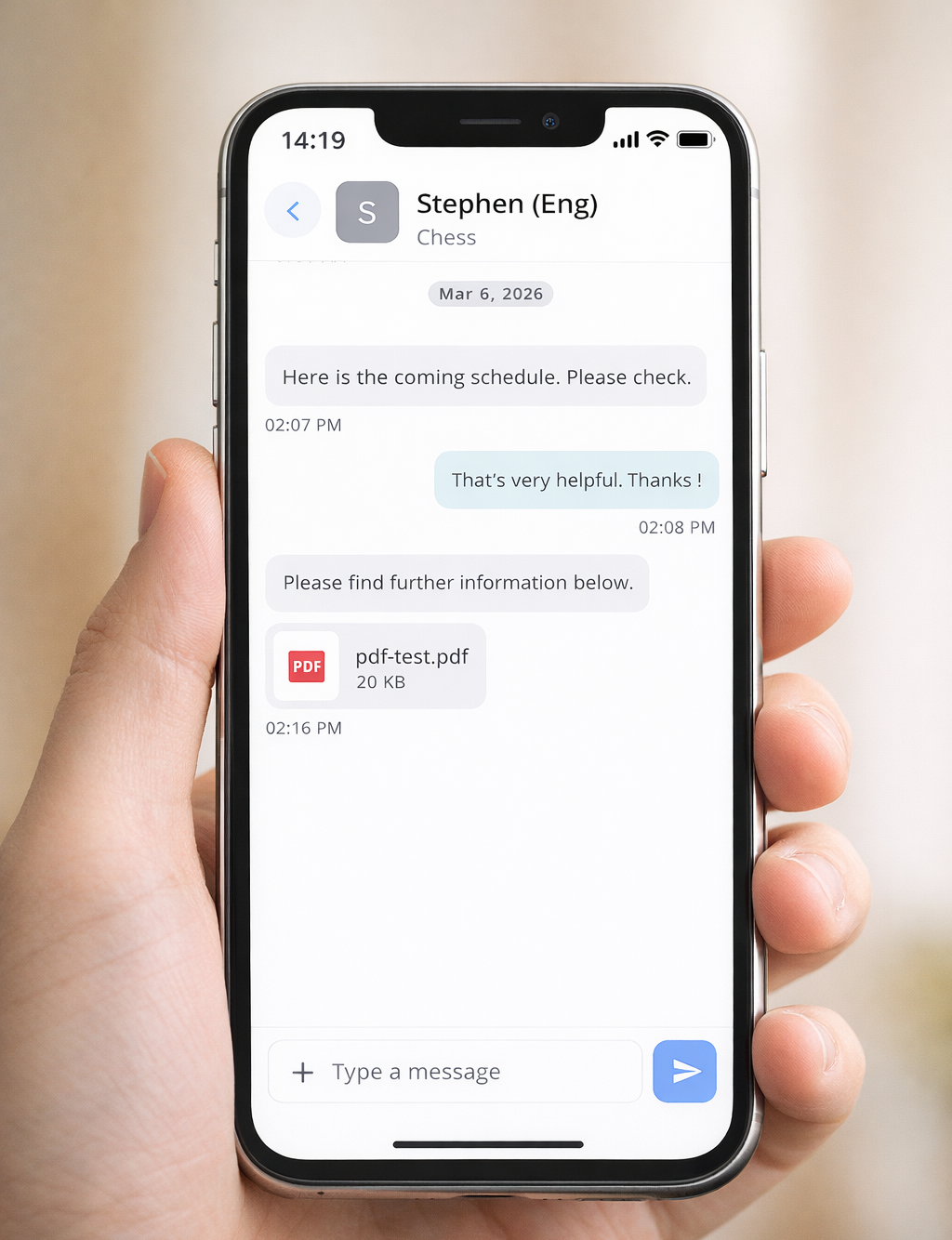
Messenger is SchoolTracs' built-in chat that connects teachers, students, parents and centre staff through the Student App, Teacher App and Web platform, with every conversation managed in one place, and unlike relying on WhatsApp, no personal phone number ever changes hands. It's an opt-in feature you switch on centre-wide, and where centres do turn it on, it gets genuinely heavy use from teachers and parents alike.
- No phone numbers required, so staff and family contact details stay private and boundaries stay professional.
- Contacts are linked automatically to the relevant class, so there is no adding contacts or searching directories, and teachers and students only see class-related contacts.
- Teachers and students can discuss lesson topics in real time, ask questions, share ideas and send PDFs and supporting materials.
- Administrators can review conversations when support is needed, and all communication stays within the school platform.
How Can My Whole Team Handle Parent Enquiries Together?
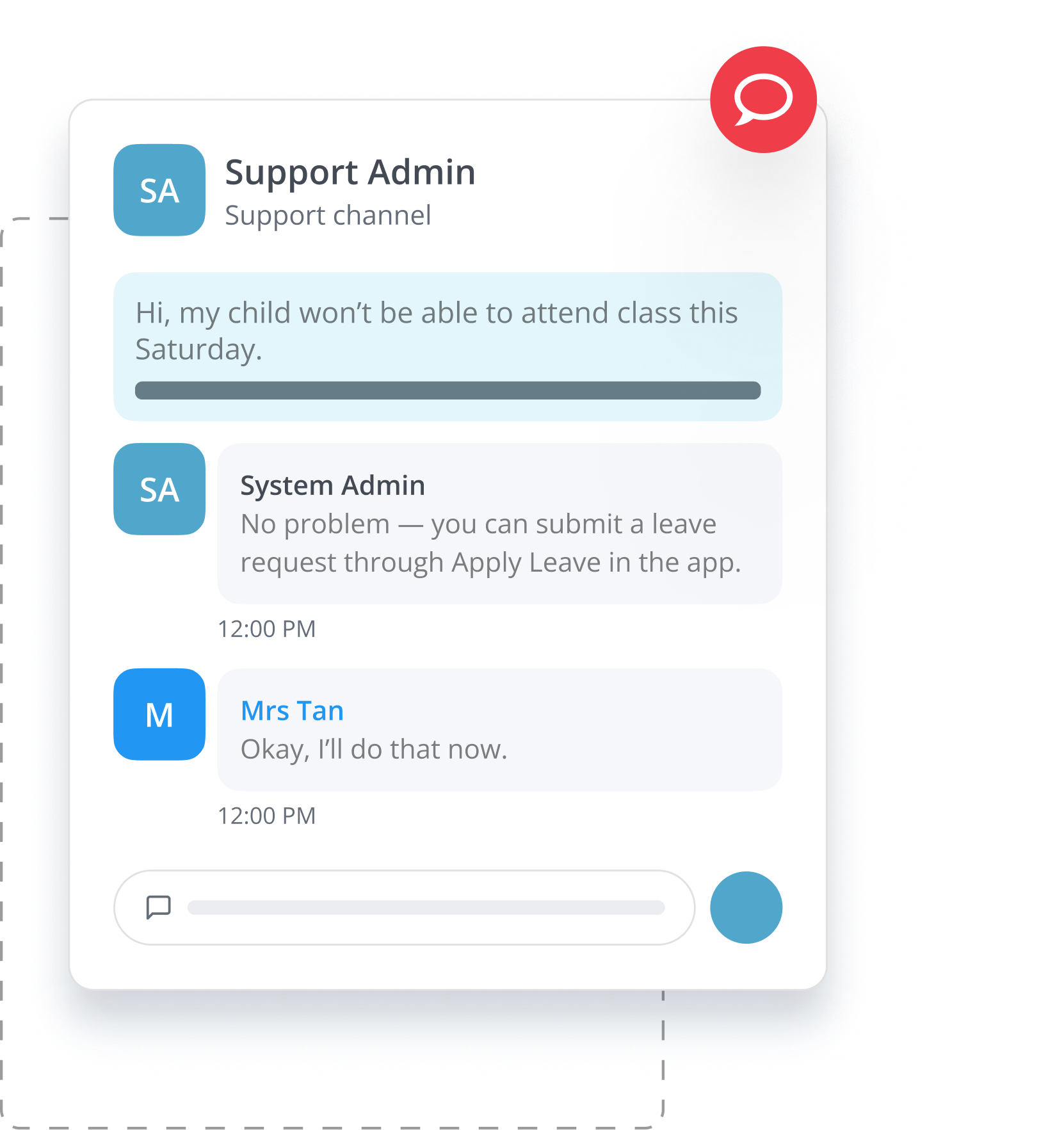
Parent communication shouldn't live in one staff member's personal chat history. Messenger also works as a shared support channel that scales with your centre.
- Students and parents can contact your centre directly for rescheduling or course queries.
- Multiple staff members can join the same conversation and reply in one shared thread, making handovers and team coordination much easier.
- Managers can view conversations for monitoring, helping your centre maintain service quality and improve follow-ups.
How Do I Get Notices Signed Without Paper Slips?
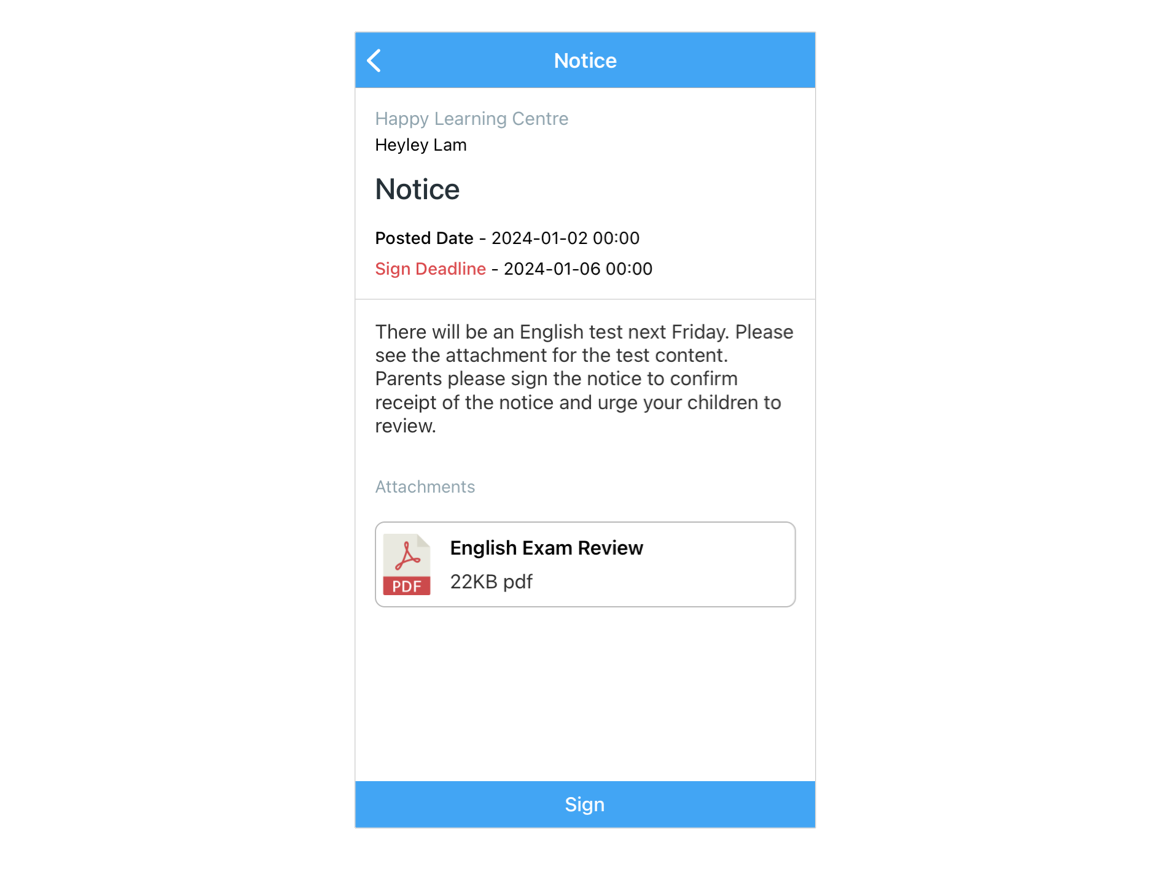
Chasing paper reply slips is one of the most tedious jobs at the front desk. With SchoolTracs, the whole notice workflow moves into the Student App:
- Send notices containing PDFs or images directly to parents through the Student App.
- Parents acknowledge and sign the notice within the app itself.
- Schedule specific send dates and times, so important information reaches parents at the right moment.
- Track which parents have signed and identify those who haven't, keeping follow-up organized.
How Do I Stop Students Missing Rescheduled Lessons?
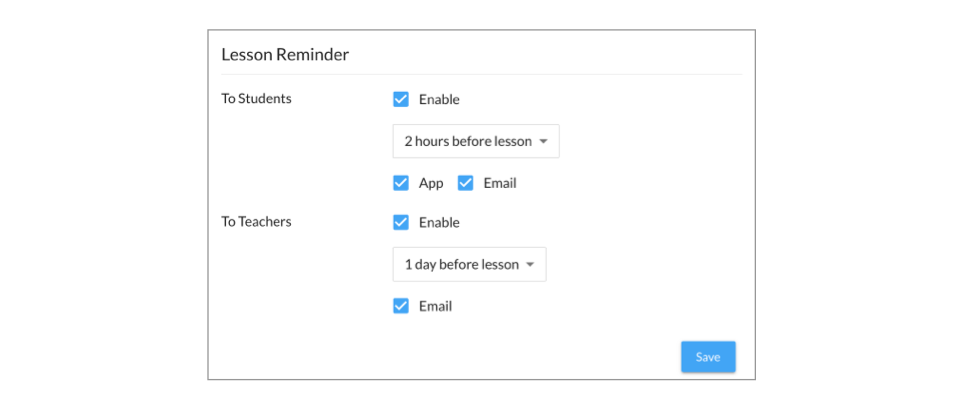
When time slots change because of make-up sessions or ad hoc adjustments, a missed message means a missed lesson. SchoolTracs lesson reminders close that gap automatically.
- Both students and teachers receive prompt reminders about scheduled lessons.
- Customise the timing, for example one day before the lesson, for students and teachers alike.
- Reminders are delivered to email inboxes and the SchoolTracs mobile app, so no class is missed due to schedule changes or oversights.
- For recurring announcements, save a Message Template once and reuse it, instead of retyping the same notice every time.
How Do Parents Know Their Child Arrived Safely?
Students' safety is important to parents, and notifying them of arrivals and departures is part of your centre's duty of care. SchoolTracs automates it:
- Print a batch of barcode labels and attach them to handbooks or student cards, or let students show the identified QR code in their SchoolTracs mobile app.
- Staff scan the barcode or QR code when students arrive and leave.
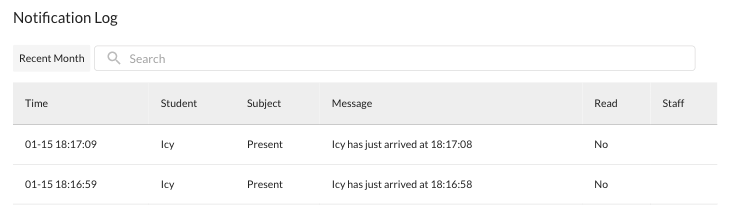
- The system sends a check-in or check-out notification to parents instantly.
- Parents gain confidence in your centre's care, and the alerts double as a record of how many lessons the student has attended.
How Do I Cut Down Routine Calls About Payments and Schedules?
A large share of parent calls are really self-service questions: what do I owe, did my child attend, when is the next lesson? The SchoolTracs Student App answers them directly, saving parents time on the phone and saving your staff the effort of looking things up.
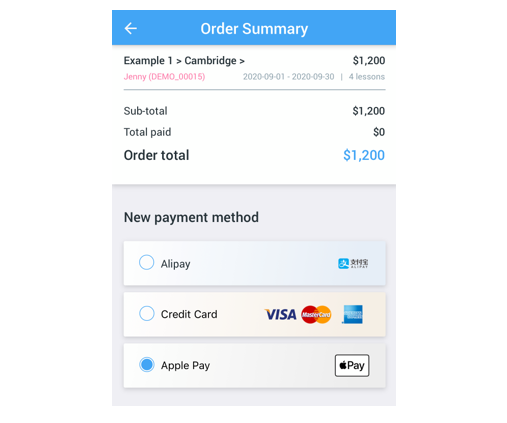
- Payment reminders arrive in the app, with all unpaid lessons listed so outstanding amounts are clear.
- Parents pay tuition in the app via Alipay, Apple Pay and all major credit cards, and receive a digital receipt instantly.
- All receipts are listed in the app, so parents can review payment history and download digital receipts whenever they need them.
- Parents can check attendance records and lesson schedules themselves, and even apply sick leave for their children through the app.
Once lessons are marked, parents can also follow their child's learning through journals; see our guide on student progress reports parents actually read.
How Do I Prove What Was Sent, and When?
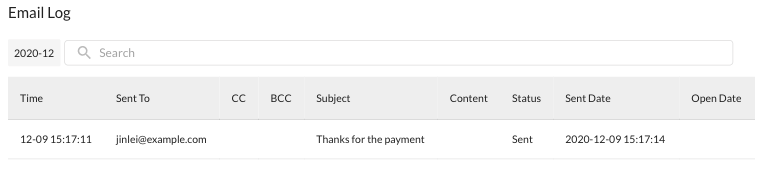
The biggest weakness of personal messengers and ad hoc email is that nobody can track who sent what, and when. In SchoolTracs, every message an administrator sends is recorded in the system with its timestamp. If a parent asks about the latest update, staff can find the history in a second. If a parent reports they never received a reminder, you can immediately see whether the message was never sent to that contact or simply missed.
Putting It Together: A Simple Communication Workflow
Here is how the pieces combine into one calm routine for your centre:
- Step 1: Store all parent contacts in SchoolTracs and use advanced search to build target groups for announcements.
- Step 2: Move class discussion and parent enquiries into Messenger, with staff sharing support threads and managers monitoring quality.
- Step 3: Send notices needing acknowledgement through the Student App and track signatures.
- Step 4: Turn on lesson reminders and check-in/check-out notifications so routine updates run automatically.
- Step 5: Let the Student App handle payment, receipt, schedule and attendance questions, and lean on the communication log whenever a dispute arises.
Parents can download the SchoolTracs Student App from the App Store and Google Play Store. Ready to retire the WhatsApp groups? Start a free trial at SchoolTracs.
Frequently asked questions
How can an education centre message parents without sharing staff phone numbers?
SchoolTracs Messenger keeps every conversation inside the Student App, Teacher App and Web platform. No phone numbers are required, contacts are linked automatically by class, and administrators can review conversations when support is needed.
Can parents be notified automatically when a student arrives at the centre?
Yes. Print barcode labels for handbooks or student cards, or let students show their QR code in the SchoolTracs app. When staff scan the code at arrival and departure, the system sends a check-in or check-out notification to parents instantly.
How do lesson reminders work in SchoolTracs?
Both students and teachers receive reminders by email and in the SchoolTracs mobile app before each lesson. You can customise the timing, such as one day before, which is especially useful when make-up sessions change the usual time slot.
Can parents sign notices digitally instead of returning paper slips?
Yes. Administrators send notices with PDFs or images through the Student App, schedule the exact send date and time, and track which parents have signed and which haven't, all inside SchoolTracs.
What can parents do in the SchoolTracs Student App besides receiving messages?
Parents can pay tuition via Alipay, Apple Pay or major credit cards, download digital receipts, review payment history, check attendance records and lesson schedules, and apply for sick leave for their children.